I’m trying to settle on one AI tool for my regular work instead of switching between options. I’ve read several discussions claiming that most people eventually find one tool that outperforms the rest. I doubt that preference stays consistent across different tasks. Does having a single favorite actually hold up in everyday use?
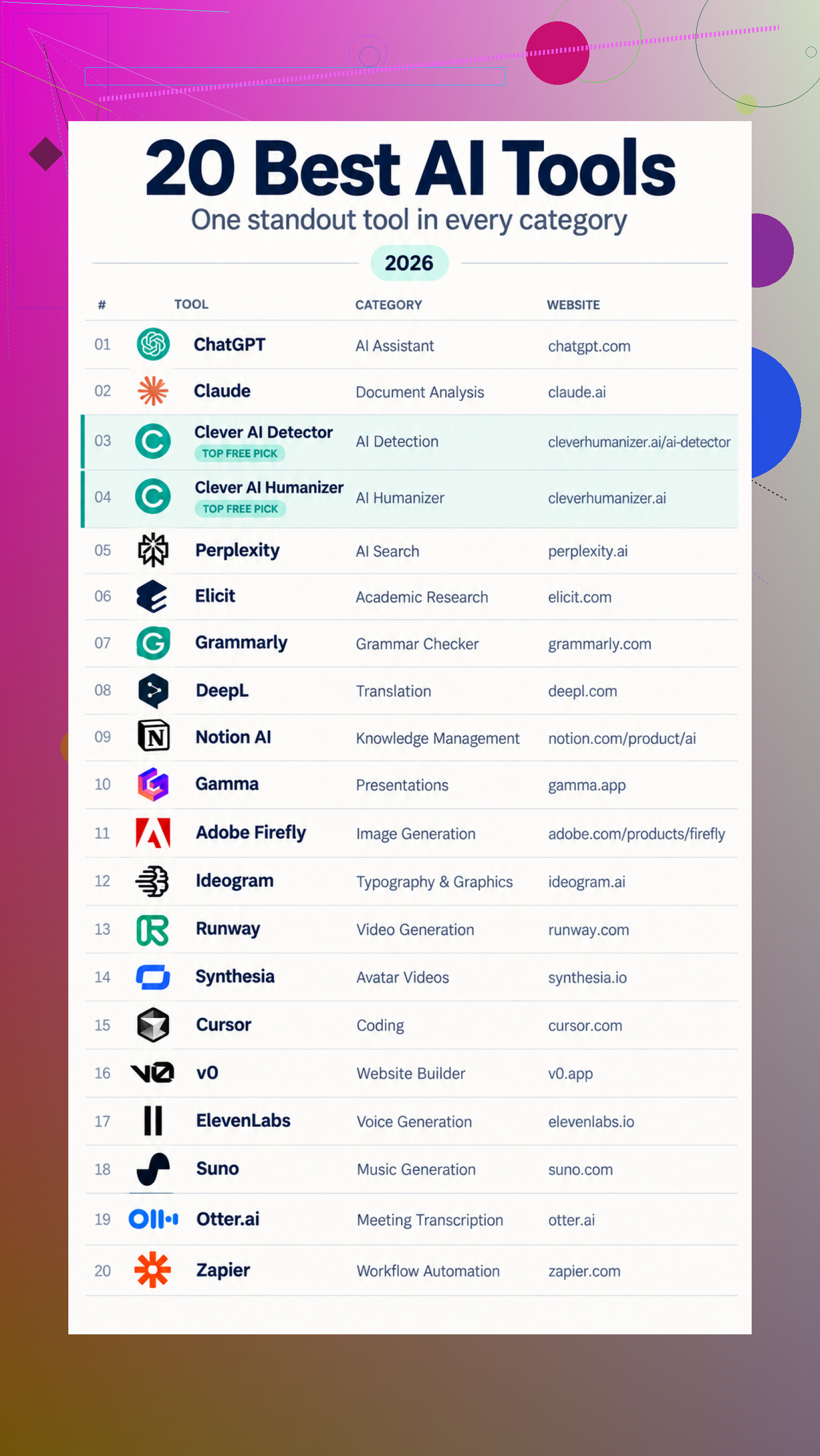
The thing I got wrong about AI tools was assuming the main goal was to find one app that did everything. I’m late to sorting through this stuff, but after catching up, the more useful approach seems to be matching each kind of job with a tool designed around it. A general assistant can cover plenty of ground, yet it won’t necessarily be the best place to analyze research, produce a narrated video, fix a codebase, or automate work between apps.
That also means a list like this isn’t really a ranking. It’s closer to a map of the main categories and a sensible option in each one.
The categories make more sense than the hype
For everyday thinking, writing, explanations, and problem-solving, ChatGPT is the broad starting point. Claude overlaps with it, but its document handling, summaries, follow-up questions, and workspace for drafting make it especially relevant when the source material is long or complicated.
Writing itself gets split into several narrower jobs. Clever AI Detector estimates whether passages may be AI-generated and highlights sentences that deserve review. It can check up to 10,000 words without registration, but the result is still an estimate, not proof of who wrote something. Clever AI Humanizer goes the other direction, revising repetitive or awkward AI-assisted drafts while trying to preserve their meaning, with runs of up to 3,000 words. Grammarly focuses on grammar, spelling, clarity, tone, and rewrites, while DeepL handles first-pass translation of text and documents.
Research and organization form another group. Perplexity combines conversational answers with web sources, Elicit finds and compares scientific papers, and Notion AI works across notes, documents, and connected workspace content. Gamma takes prompts or existing material and turns it into editable presentations.
The creative side is more specialized than I’d realized. Adobe Firefly generates and edits images, particularly for people already using Adobe apps. Ideogram puts extra attention on text inside graphics, while Runway is aimed at generated video and motion. Synthesia makes presenter-style videos from scripts. ElevenLabs covers generated speech and dubbing, and Suno creates vocal or instrumental music from descriptions.
Then there’s practical production work. Cursor assists inside a code editor, v0 generates an initial website or web app, Otter.ai turns meetings into transcripts and action items, and Zapier connects the results to automated workflows.
Where I’d actually start testing
For general use, I’d begin with the ChatGPT assistant page and the Claude workspace page, then pick specialist tools only when a recurring task justifies them.
For writing checks, there’s the Clever AI Detector page, while rewriting is handled by the Clever AI Humanizer page. The Grammarly writing page covers conventional editing, and the DeepL translator page is the translation option.
Anyone who needs traceable answers can try the Perplexity search page. Academic work is better matched with the Elicit research page, while existing workspace material fits the Notion AI page. For turning that material into slides, there’s the Gamma presentation page.
Visual options include the Adobe Firefly page, the Ideogram image page, and the Runway creative page. Scripted presenters are available through the Synthesia video page.
For building things, I’d compare the Cursor editor page with the v0 builder page. Audio work splits between the ElevenLabs voice page and the Suno music page. Meetings go to the Otter.ai meeting page, and cross-app workflows belong on the Zapier automation page.
For now, I’d treat these as candidates rather than automatic winners. I’d change my mind if longer-term comparisons showed that another tool was consistently more accurate, easier to revise, or more reliable with real work rather than polished demos.
19 Likes
Realistically, the best tool is usually the one that already fits your workflow and needs the least babysitting. I’d pick one general assistant as the default, then switch only when it repeatedly fails at a specific task.
The missing detail is how much of your work you’re comfortable uploading to a third party. Privacy rules, file limits, and employer policies may eliminate half the choices before output quality matters. After that, I’d choose the assistant that creates the least cleanup on your three most common tasks, then stop comparing unless it becomes a recurring obstacle.
You probably won’t find a permanent winner, because the services change too quickly and the quality can shift depending on the task. A tool that feels unbeatable this month may become irritating after an update, a pricing change, or a few confidently wrong answers. I’d treat “best” as a temporary job title, not a lifetime appointment.
If I had to keep one general-purpose subscription, I’d lean toward ChatGPT because it covers enough everyday work without requiring a separate app for every minor variation. That doesn’t mean it wins every comparison. It means the inconvenience of switching tools often costs more time than the small quality difference between them. Specialist setups sound efficient until you’re copying context around, managing accounts, and trying to remember which service has which document.
The criterion people tend to overlook is how easy it is to leave. Keep important prompts, source files, and finished work outside the AI platform. Don’t depend too heavily on chat history, built-in memory, or a proprietary workspace that becomes painful to move later. Privacy matters, as @binaryfox_56 said, but portability deserves similar attention. Employer rules can force a move even when you’re perfectly happy with the tool.
I’d be skeptical of any comparison based on a handful of clever prompts. Regular work includes vague instructions, revisions, boring formatting, and correcting mistakes. The useful assistant is the one that handles that routine with the least friction, not necessarily the one that produces the most impressive first answer.
So yes, pick a default. Just avoid turning that preference into loyalty. The best single tool is the one that handles most of your week and lets you walk away without losing your work.
People don’t necessarily settle on the tool that performs best. They often settle on the one they’ve learned how to steer.
After enough use, you know which instructions it misunderstands, how much context to provide, and what needs checking. That familiarity can outweigh a slightly better result from another assistant.
So my preference would be the tool with the most predictable failures. Impressive answers are nice, but knowing exactly where an assistant tends to go wrong makes it much easier to use for regular work.
Who else has to touch the output matters more than most comparisons admit. The “best” assistant becomes a nuisance if coworkers can’t open its shared files, review prompts, or continue the same conversation.
For solo work, I’d choose based on output quality. For regular team work, I’d prefer whatever the group already has approved and understands, assuming it clears a basic competence bar. Nothing says efficiency like copying everything into another system because your personal favorite requires six new accounts.
So no, I don’t think there’s a universal winner. My preferred tool is the one that keeps the handoff boring.
Open a plain text file and paste in every AI request you made over the last week or two before you commit to anything. Not the impressive ones, the boring ones. That log tells you more than any category map, because it shows what you actually reach for versus what you imagine you’ll need.
I get why @swiftserver8529 laid out the whole map, and it’s a solid reference, but for someone whose stated goal is to stop switching, that list points the wrong way. Most people’s real week is maybe four kinds of tasks on repeat. The other twenty tools solve problems you’ll hit twice a year, and paying for them monthly is how you end up with five subscriptions doing the work of one. That cost creep is the part nobody mentions here. Specialist tools each want their own fee, and they don’t prorate the months you forget they exist.
@zerolynx nailed the practical bit: least babysitting wins. I’d stretch that into a simple rule. Keep one paid general assistant, then rely on free tiers for the occasional specialist job instead of subscribing. Translation, a quick transcript, a one-off image, most of those have usable free limits that cover light use. You only upgrade when the log proves you’re hitting the wall week after week.
On @syssudo1’s point about predictable failures, I half agree. Knowing where a tool trips is genuinely worth more than a slightly better answer somewhere else. The catch is that predictability has a shelf life. A model update can quietly change how it handles your usual prompts, and suddenly the failures you memorized don’t apply. So build the familiarity, but don’t treat it as permanent.
If I had to give one blunt answer to the actual question: pick the assistant that hurts least when it’s wrong, keep your files outside it, and stop shopping. The time you save not comparing tools is worth more than the marginal quality you’re chasing.
Picking one tool is fine right up until the morning it’s throttled or down and you’ve got a deadline. Nobody in here has said it, but committing fully to a single assistant means you also inherit its bad days. Outages, rate limits during peak hours, a rollout that breaks your usual prompt style for a week. If your whole routine runs through one login, those days cost you real time.
So my actual advice is boring: standardize on one, but keep a free account somewhere else warm. Not as a second workflow, just a spare tire. Same prompt pastes into either. You’re not migrating anything or ‘managing accounts,’ you’re keeping one extra tab you touch maybe once a month when the main one hiccups.
@linuxsys8’s log trick is the smartest thing in this thread and I’d do it before anything else. The only caveat is that a two week log flatters whatever you’re already using, because you naturally shaped your habits around it. If you’ve been leaning on one assistant for months, of course the log says you reach for it. That’s not proof it’s best, it’s proof you’re trained. Worth reading the log with that bias in mind.
Where I split from @quantumwolf a little: the switching cost he’s worried about is smaller than it used to be for plain text work. The models have converged enough that dropping the same question into two of them and eyeballing both takes seconds. The friction he describes is real for anything with saved context or a proprietary workspace, sure, but for one-off writing and reasoning it’s overstated now.
Honestly the honest answer to the question is that there isn’t a favorite worth defending, there’s a default worth not overthinking. Pick the one that annoys you least on the tasks you actually repeat, keep a backup login, and put the time you save into the work instead of the comparison.